


Zintego - Invoice Maker
4.653.00 Reviews
App Specs
- Version
- 1.6.1
- Updated On
- License
- Free
- Downloads
- 100,000+
- Developer
- Monster Brain Studios Limited
- Categories
- Business
- Platform
- Android
Screenshots
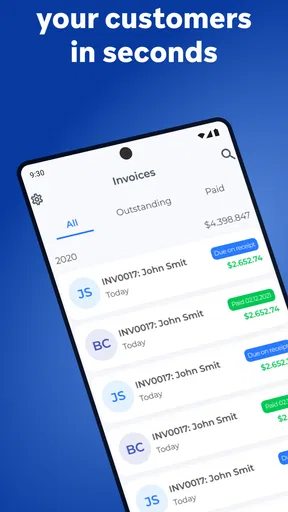
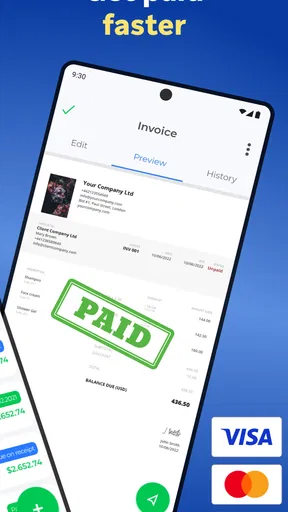
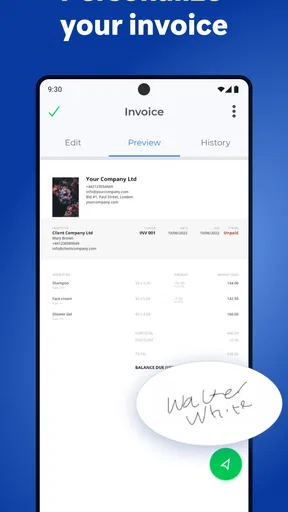
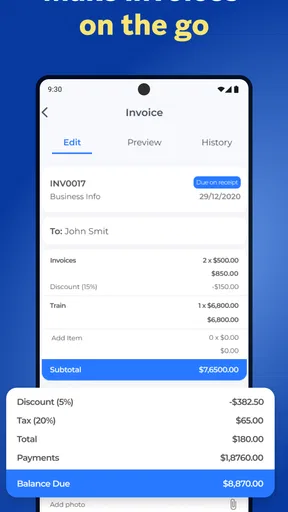
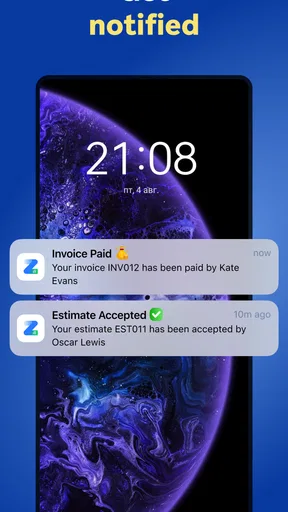
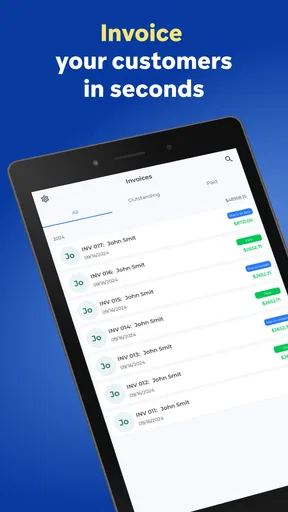
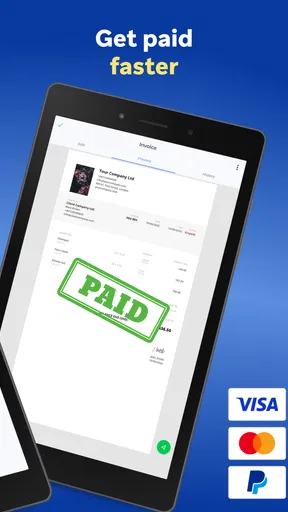
 Analysis by AppCompare
When I try an invoice app, I am not only checking whether it can produce a document. I also want to know how comfortable it feels when I am handling customer details, business information, and payment-related records. Zintego - Invoice Maker is aimed at that everyday business task, with a simple promise: help you prepare invoices without turning the process into a full accounting project. After spending time with it, I see it as a practical option for freelancers, independent tradespeople, and very small businesses that need a quick way to organize billing from a phone.
The app is free to download and sits in the Business category. It comes from Monster Brain Studios Limited, and its public reception is encouraging, with a 4.6 average from around 1.6 thousand ratings. That does not automatically make it right for every business, but it does suggest that the basic invoice-making workflow is easy enough for many people to understand. Its Everyone age rating also makes the presentation feel approachable rather than specialized or intimidating.
My main impression is that Zintego is most useful when speed and simplicity matter more than deep financial management. If I only need to prepare a clean invoice for a client, keep my billing routine moving, and avoid opening a complicated desktop accounting system, this kind of focused tool makes sense. If I need advanced bookkeeping, detailed tax reporting, stock management, or a complete business ledger, I would look elsewhere.
A closer look at trust, control, and everyday billing
I look at trust and control as practical parts of billing, not abstract extras: a clear routine for checking, sharing, and keeping each document can prevent avoidable confusion later. I also find it useful to decide in advance which records belong in an invoice app and which should remain in a separate accounting system. That distinction leads naturally to the day-to-day workflow and the trade-offs of choosing a focused billing tool.
Why trust matters more than a polished invoice
An invoice app handles information that can be sensitive even when the app itself feels lightweight. Customer names, addresses, business identities, service descriptions, totals, and payment instructions can all appear in one document. That means I judge Zintego less by attractive screens and more by how deliberately I can use it. The important question is not simply whether an invoice looks professional; it is whether I remain aware of what I am entering, saving, and sharing.
Zintego’s position is clear from its purpose. It is an invoice maker rather than a broad business suite, and that narrower focus can be reassuring for someone who does not want a large system controlling every part of their finances. A smaller workflow is easier to understand. I can approach the app as a document-preparation tool instead of assuming it replaces an accountant, a bookkeeping platform, or a payment processor.
The developer is Monster Brain Studios Limited, and the app has reached over one hundred thousand installs. I treat that level of adoption as useful context, not as proof that every privacy or workflow concern is solved. Popularity can tell me that people are finding the app, but it cannot replace careful attention to the choices shown on the device. I would still review prompts, permissions, and any account or storage options before entering real client information.
Worth Reading Before You Choose

EA SPORTS FC Mobile 26 Is a Bigger Football Game, but It Takes Time

Flipboard Shows What News Apps Must Do Beyond the Feed

Switching to Android Auto Means Rethinking Your Driving Routine

Google Calendar Makes a Crowded Week Easier to Manage

Ludo King Makes the Most of the Minutes Between Plans

Baby Panda World Brings Quick Play to Modern Phones, but Its Game Library Feels Busy
That is especially important because the app includes in-app purchases ranging from $6.99 to $199.99 per item. The free entry point is attractive, but I would not assume that every useful capability is included at no cost. Before building my entire billing routine around it, I would check which tools are available in the free experience and which actions lead to a purchase screen. This is a sensible habit with any free business app, particularly one that may become part of a regular workflow.
What I would verify before using real customer records
I like to separate three things that are often blurred together: creating an invoice, storing information, and sharing the finished document. An app can be convenient at the first step while still requiring extra care at the other two. With Zintego, I would look closely at every visible choice related to account creation, saved clients, document history, exports, and sharing. If the app asks for access to device features, I would consider whether that access is necessary for the action I am trying to perform.
This is not a criticism of Zintego specifically. It is a sensible routine for any tool that may contain business records. I would begin with a test customer rather than a real client, create a sample invoice, and explore the available controls. That lets me see how information is displayed, whether editing is straightforward, and what happens when I try to share or remove a draft. It also gives me a chance to understand the app’s behavior before it becomes part of a busy workday.
I would also avoid treating the app as the only copy of an important invoice. Once a document has been finalized or sent, I would keep an organized backup using a storage method I already trust. This matters because an invoice maker is not necessarily a complete records-retention system. A simple backup habit protects me from losing access to a document and makes later reconciliation easier.
Another useful check is to inspect the recipient view before sending anything. I would send a test version to myself, examine the layout on another device, and confirm that the business name, contact details, totals, and payment instructions appear as intended. This catches small mistakes that are easy to miss while editing on a phone. It also prevents me from discovering a formatting problem only after a customer has received the document.
The workflow I found most practical
The strongest use case is a short, repeatable billing routine. Imagine I have finished a small repair job or delivered a freelance assignment. Instead of waiting until I return to a computer, I can open an invoice tool while the details are still fresh. I would identify the customer, describe the work clearly, enter the amount, review the document, and prepare it for delivery. That immediacy is valuable because delayed invoicing is one of those small habits that can create unnecessary confusion.
I would make the description specific rather than relying on vague wording. For example, I would separate labor from materials or list the stages of a project instead of writing one broad line. This is not a special feature; it is a better way to use an invoice maker. Clear descriptions reduce follow-up questions and make the document more useful to both sides later.
A less obvious advantage of a mobile-first routine is consistency. If I create a simple personal template for how I describe services, I can avoid changing terminology from one invoice to the next. The app becomes more useful when I decide in advance what information belongs on every document. I might always include the project name, service period, payment instructions, and a short note about follow-up. That preparation turns a basic form into a dependable process.
I would still pause before sending. Mobile convenience can encourage rushed entries, especially when I am standing at a job site or moving between appointments. My final check would cover the customer identity, invoice reference, line descriptions, totals, and recipient address. The extra minute is worthwhile because correcting a wrong invoice after delivery is more awkward than reviewing it before sharing.
Where user agency makes the difference
For me, control means being able to decide what information goes into an invoice, when it is shared, and where I keep the final record. Zintego is appealing when it supports that direct relationship between my action and the document I produce. I do not want a billing tool to make me feel that a routine invoice requires a complicated setup process.
At the same time, I would not hand over judgment to any invoice generator. A professional-looking document can still contain an incorrect amount, an incomplete description, or payment instructions that I have not checked. The app may help with presentation and speed, but I remain responsible for the accuracy of the content. That distinction is important for new freelancers who might assume that a polished layout means the invoice is automatically complete.
I would also think carefully about shared devices. If other people can use my phone or tablet, I would avoid leaving customer records open and would use the device’s own security controls. The right approach depends on how the device is managed, but the principle is simple: convenience should not mean leaving business information visible to anyone nearby.
Account choices deserve the same attention. If I am offered a sign-in or synchronization option, I would decide whether it genuinely helps my workflow before accepting it. Some users may value access across devices, while others may prefer a more limited setup. The best choice depends on how often the app is used, whether more than one person needs access, and how the business already handles documents.
How it compares with paper, spreadsheets, and full accounting tools
Compared with handwritten invoices, Zintego should be more convenient for anyone who wants a repeatable digital document. A phone-based workflow is easier to use when I am away from a desk, and a digital file is generally simpler to send than a sheet of paper. The trade-off is that I have to pay attention to storage, backups, and the privacy of the device itself.
Compared with a spreadsheet, a dedicated invoice maker can reduce the temptation to rebuild the same layout every time. Spreadsheets are flexible, but that flexibility can become a burden when I am trying to bill quickly. A spreadsheet also makes it easier to accidentally overwrite formulas or change a structure that I meant to preserve. Zintego is better suited to someone who wants a focused billing action rather than a blank grid.
Compared with a full accounting platform, the choice is less obvious. A larger system is usually the better direction for a business that needs expenses, tax preparation, bank reconciliation, inventory, recurring financial reports, or multiple staff members working from shared records. Zintego makes more sense when invoicing is the immediate problem and the rest of the bookkeeping is handled elsewhere.
That division of labor can actually be sensible. I would use the app to prepare and send invoices, then maintain the official financial record in the system I already use for accounting. The important step is to establish a consistent naming and filing routine so that documents do not become scattered across devices and services.
Small habits that make the app safer and more useful
My first practical tip is to create a sample invoice before entering a real client. I would use fictional details, test the editing flow, inspect the final appearance, and try the sharing process. This reveals friction early and helps me understand which fields deserve extra checking. It is also a simple way to avoid exposing customer information while I am still learning the interface.
My second tip is to separate drafting from sending. I would prepare the document, save or review it, and only then return to it for the final delivery step. That pause creates a useful barrier against sending a half-finished invoice. It is particularly helpful when I am interrupted during a job or when several customers have similar names.
My third tip is to keep a parallel record of what has been sent. Even a modest business benefits from knowing which invoices are drafts, which have been delivered, and which have been paid. I would not assume that an invoice maker alone provides the complete status system I need. A simple external ledger or accounting process can fill that gap without making the app responsible for every financial decision.
A fourth trade-off concerns purchases. Because optional items can cost from $6.99 to $199.99, I would explore the free workflow first and identify the exact point at which a paid option becomes relevant. I would only pay if the feature solves a real recurring problem, not because a purchase prompt appears during setup. This approach keeps the app’s cost aligned with the amount of billing work it actually saves me.
Who should use it, and who should choose something else
I would recommend Zintego to a freelancer who sends straightforward invoices, a contractor who needs to bill from different locations, or a small service provider who does not want to learn a large accounting package. It is also a reasonable starting point for someone moving away from handwritten invoices and looking for a more organized digital routine.
I would be more cautious if the business has several people creating invoices, needs strict approval steps, or must connect billing with inventory and detailed financial reporting. In those situations, a full accounting or enterprise billing system is likely to be a better foundation. The same applies to anyone who needs specialized tax handling or a comprehensive audit trail; a focused invoice maker should not be mistaken for that kind of platform.
I would also skip it if I am unwilling to review sharing, storage, and purchase choices myself. No app can remove the need for basic information discipline. Zintego can make invoice preparation easier, but it does not eliminate the responsibility to check recipients, protect devices, preserve records, and keep financial information accurate.
My final view after using it
Zintego - Invoice Maker is a sensible business app for people who want a direct route from service completed to invoice prepared. Its free availability, approachable presentation, and focused purpose make it easier to consider than a heavyweight accounting suite. Monster Brain Studios Limited has positioned it for an audience that values a simple billing task rather than a complete financial command center.
I like it most when I treat it as one part of a larger routine: test the workflow, enter only the information needed, review every detail, share deliberately, and keep a separate record of important documents. That approach respects both the app’s convenience and its limits. The public response, with more than one hundred thousand installs and a 4.6 average, gives it a credible starting point, while the current version, 1.6.1, is the one I would look for when checking compatibility on a device running Android 6.0 or newer.
My cautious verdict is positive for light, mobile invoicing. I would recommend trying the free experience with sample data first, especially because optional purchases are available and business records deserve careful handling. If the workflow matches the way I bill, it can save time without forcing me into a larger system. If my needs extend beyond invoices, I would pair it with proper accounting software or choose a broader alternative instead. The best reason to use this app is not that it replaces every business tool, but that it can make one recurring job easier while leaving the important decisions in my hands.
Pros
- Creates professional invoices quickly from your phone.
- Supports reusable client and product information.
- Helps track invoice status and payment details.
- Useful for freelancers and small businesses on the go.
- Simplifies estimates and receipts in one place.
Cons
- Some useful features may require a paid subscription.
- Advanced customization options can feel limited.
- Cloud syncing may depend on account setup and internet access.
- Not ideal for complex accounting or inventory management.
- Frequent invoice creation may require extra data entry.
FAQs for Zintego - Invoice Maker
What is Zintego - Invoice Maker used for?
Zintego - Invoice Maker is designed to help freelancers, contractors, and small businesses create professional invoices from a mobile device. You can typically enter customer details, add products or services, apply taxes or discounts, and review the total before sharing the document. It is especially useful for users who need a simple invoicing tool without relying on complicated accounting software.
Can I customize invoices created with Zintego?
The app provides tools for preparing invoices that look more professional and can be adapted to your business needs. Depending on the available version and settings, you may be able to add business information, customer details, invoice numbers, dates, line items, taxes, notes, and payment terms. Before downloading, users should check which branding, template, and customization options are included in the free plan.
Can I send or share invoices directly from the app?
Zintego - Invoice Maker is intended to make the final invoice easy to deliver to a customer. After creating and checking an invoice, users can generally save it or share it through common options such as email, messaging applications, or other installed services, often as a document or PDF. Sharing availability can vary by device, operating system, and subscription level.
Is Zintego - Invoice Maker free to use?
The application may offer free access to basic invoicing features, but some tools can be restricted by in-app purchases, subscriptions, advertisements, or premium plans. These limitations may affect templates, document exports, recurring invoices, branding removal, or advanced business features. It is important to review the current pricing and trial conditions in the Google Play Store or Apple App Store before subscribing.
Is Zintego suitable for professional accounting and tax management?
Zintego - Invoice Maker can be helpful for producing and organizing everyday invoices, but it should not automatically be treated as a complete accounting system. Businesses that need bank reconciliation, payroll, detailed expense tracking, inventory management, tax filings, or legally specialized invoice formats may require additional software. Always verify that the app’s invoice features meet your local regulations and record-keeping requirements.


